The Blue Ocean Mind

In my third year of running Rosetta Stone as CEO, I opened the book Blue Ocean Strategy, and it was a pivotal moment.

Ten years ago, I picked up a copy of Blue Ocean Strategy at an airport bookstore.

At the time, I was in my third year of running Rosetta Stone as CEO and we were enjoying annual growth rates of close to 100%. While still operating out of a converted seed warehouse in rural Harrisonburg, Virginia, I engaged consultants and advisers who invariably asked me: “Who’s your competition? What are your competitor’s strengths? How can you stay ahead or catch up?” or “Do you know how big the language learning industry is today? How fast is it growing? How can you gain market share?” Those weren’t the things we were focused on! We were thinking about how to build an interesting, enduring and delightful company.

We were an emerging company and were…well…a bit odd. Our price point was tenuous (twenty times the cost of rival language learning software). Marketing spend also seemed unsustainably dominant (with sprawling kiosks and crazy-high ad spending), all managed without an integrated media plan. Indeed, we were unfocused in terms of our end markets, offering the same curriculum in 25+ languages to the US Army, Fortune 500 companies, school districts, homeschoolers, and individual consumers. We were a legacy of seemingly illogical decisions (we were told) in need of a strategy to become more competitive.

And yet, we had just become the #1 company in the US language learning industry by revenues overtaking the long established brick-and-mortar based Berlitz. We were profitable, and were one of the fastest growing companies in the nation. We certainly did not feel like we were all wrong—even if we didn’t have it together in all sorts of ways. We were doing well, and enjoying the ride.

Discovering Blue Ocean Strategy was a pivotal moment for me. It provided a framework for what we had been doing and explained why our independent and unusual approach was working. It spurred me to hone our strategic approach as we evolved new innovative offerings and business models. And as colleagues also became familiar with Blue Ocean Strategy, the powerful concepts became part of our common parlance across the company, inspiring product designers to re-think English language training in Asia, while also helping with on-boarding new collaborators who typically wanted to teach us their more reasonable way of focusing on beating the competition.

While not every single Blue Ocean Strategy turned to gold, it was the right framework for designing solutions to age-old problems. Like anything in life, it will not work every time and reality is unpredictable. But it is a wonderful way to approach work and life in general—a license to do what you think is right, and to stop wasting time on stuff that you don’t think is required. It is what explains success such as Tesla, Cirque du Soleil and IKEA—and how they escape the traditional competitive mindset that is so limiting and even exhausting. If you haven’t yet used the Blue Ocean Strategy framework to think about your company and life, please do so! You’ll be happier for it.

As one of our first courses at Pedago, we’ve developed a quick intro to Blue Ocean Strategy via our new platform Smartly. Whether it is your first contact with the framework or more of a refresher, with Smartly, you’ll breeze through it!

And in the process, you’ll get to see what Alexie, Ori and I, and the rest of the Pedago team, have been up to over the past couple of years. We think we’ve come up with a powerful new way to teach using technology, and we hope that it works for you. In the future, we’ll develop many more courses using this platform and technology.

Our solution is designed for the smartphone, and works great on desktop and tablet. And there aren’t any plans for a CD-ROM or any bright box packaging! So get going and escape the red ocean by going to Blue Ocean Strategy.

May Blue Ocean Strategy become your team’s strategic lingua franca!

Fixturies: The speed of fixtures and the maintainability of factories

We had a rails app. We used factories in our tests, and it took ten minutes to run them all.  That was too slow. (spoiler alert: by the end of this blog post, they will run in one minute.)

We suspected that we could speed up the test run time by using fixtures instead, but worried that fixtures would be much more difficult to maintain than our factories.

As it happens, we are not the first developers to deal with the issue that factories are slow and fixtures are hard to maintain.  I cannot explain the issue any better than the following folks do, so I’ll just give you some quotes:

“In a large system, calling one factory may silently create many associated records, which accumulates to make the whole test suite slow …”

“Maintaining fixtures of more complex records can be tedious. I recall working on an app where there was a record with dozens of attributes. Whenever a column would be added or changed in the schema, all fixtures needed to be changed by hand. Of course I only recalled this after a few test failures.”

“Factories can be used to create database records anywhere in your test suite. This makes them pretty flexible and allows you to keep your test data local to your tests. The drawback is that it makes them almost impossible to speed up in any significant way.”

In our case, 99% of our tests were using identical records.  For example, we were calling FactoryGirl.create(:user) hundreds of times, and every time, it was creating the exact same user.  That seemed silly.  It was great to use the factory, because it ensured that the user would always be up-to-date with the current state of our code and our database, but there was no reason for us to use it over and over in one test run.

So we wrote the gem fixturies to solve the problem this way:  Each time we run tests, just once at the beginning, we execute a bunch of factories to create many records in the database.  The fixturies gem then dumps the state of the database to fixtures files, and our tests run blazingly fast using those fixtures.

We saw a 10x improvement in run times, from ten minutes down to one.  We still use factories here and there in our tests when we need a record with specific attributes or when we want to clear out a whole table and see how something behaves with a certain set of records in the database.  But in the vast majority of cases, the general records set up in that single run at the beginning are good enough.

If you are using factories in your tests to re-create the same records over and over again, and your tests are running too slowly, give fixturies a try and let us know how it goes.  It only took us about half a day to refactor 700 tests to use fixturies instead of traditional factories, so there is a good chance it will be worth your time.

text-transform: An Unlikely Source of Jank

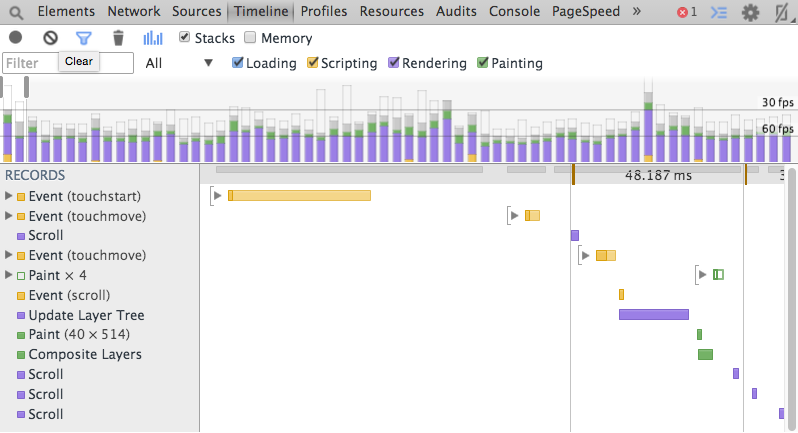
Here at Quantic, we take a hard look at the performance of our applications so that our users don’t have to experience any troublesome hiccups (or “jank”) that might otherwise sour a sweet learning experience.

While “performance” can cover a wide array of metrics, we tend to be extremely critical of browser overhead (script execution, rendering layout, and painting). While others have covered optimization of these metrics in great detail, we came across an unlikely jank-vector that we thought was worth mentioning.

When analyzing CSS performance in relation to browser lifecycle, there are a few notorious styles (eg: border-radius, box-shadow, transform, backface-visibility, etc) that tend to slow down frame rate. Some of these are obvious as they dramatically influence the rendering process or add additional calculations for stylistic ooomph. One might be extremely likely to overlook the rather mundane text-transform while focusing on that list, though.

We had several elements each containing a finite number of additional elements that all were performing CSS-dictated uppercasing on their text content. Now, this might not be a significantly intensive operation in itself, but combined with some excessively spastic scrolling, it degraded the user experience somewhat significantly. After we updated the content to be rendered in uppercase without the need for CSS text transformation, the improvement was obvious.

Here’s how things looked on a common mobile platform, prior to the change (FPS is the key metric, with 60FPS as an ideal target):

with CSS text transform

As you can see, we were barely hitting the 30FPS threshold and often even missing that window. Here’s what we observed after we removed the relevant text-transform styles:

no CSS text transform

As you can see, we’re now closer to consistently hitting that golden 60FPS benchmark! Granted, we were probably abusing a CSS style that was intended for narrower application, and the DOM of this particular page meant that there were a lot of them, so your mileage may certainly vary. However, this might help serve others in the war against jank!

How do I read the AngularJS message: [$rootScope:infdig] 10 $digest() iterations reached. Aborting! Watchers fired in the last 5 iterations

I’ve been using Angular every day for over a year, but have always been too intimidated by this error message—and the crazy list of information that comes along with it—to really dig into it and find out how to use it to my advantage.

Building a new product at Pedago, I see this error happen from time to time in production (possibly related to a user using an old browser), but never when developing locally. So I have the error message from our error logs, but I can’t reproduce it or debug it by making changes in the code.

After researching the issue, here’s what I found out on my own.

After the colon there are two brackets. (…’atchers fired in the last 5 iterations: [[{“msg’) The first bracket is the beginning of a json block. Copy from the first bracket to the end of the error and find a way to pretty-print that json. (Use your favorite code editor or an online json formatter.)

Now you have a pretty-printed array with 5 entries in it. Each entry represents an iteration in the digest cycle, i.e. one pass through all of the active watchers in your app, looking for changes. Angular will repeat iterations until it does one in which no watcher has a changed value, or until it hits 10 iterations, at which point it will error. That’s what happened in this case.

There were 10 iterations before the error, and 5 are included in the error message. Presumably that means there are 5 more iterations that happened earlier than what is included in the error message. The first entry in the error message is the 6th iteration, and the last entry in the message is the 10th iteration.

The entry for each iteration is also an array. In this case it is an array of objects, and each object represents a watcher whose value changed during this iteration. Each object will give you the text or the function that defines the watcher, the old value for the watcher before this iteration and the new value after this iteration.

Read it from top to bottom like a story, adding commentary based on what you know about your app. In my case, I was able to see how the changes in each iteration caused new watchers to be created, requiring yet another iteration. “In the 6th iteration, this watcher changed, causing this new stuff to be rendered on the page, creating new watchers which were assigned values in the 7th iteration, and then …” There was no infinite loop or anything. In fact, if Angular had been willing to do just 1 or 2 more iterations, it would have finished.

I hope this is helpful to anyone else experiencing this issue.

Five key principles that make geographically split software teams work

Geographically distributed teams can work. How? In my experience, there are five key principles that make all the difference.

The other day, I realized that I have worked on geographically split software teams for the last decade. I didn’t set out intending to do so. When I got my first job out of college as a software engineer, I thought being in the office was non-negotiable. If you ask company recruiters, most say in no uncertain terms they are not looking for remote employees.

But the reality on the ground is that many software companies end up letting most full-time engineers work flexible hours, from anywhere. Yet few companies acknowledge or advertise this explicitly. You can’t get this opportunity by asking for it in your interview, but after you are in the door, the opportunity arises. There are a few ways this happens.

Software companies with heavy on-call burdens, like Amazon for example, end up with an unspoken but widespread assumption that people can work from anywhere because they are working all the time. Since most engineers are contractually obligated to be on-call, and emergency issues arise at all hours of the day and night, these engineers start working remotely out of necessity. Soon, whole teams realize there is no barrier to working where and when they are most productive. On any given day during my tenure at Amazon, maybe half of my teammates weren’t in the office when I was.

 I’ve worked for several startups with surprisingly similar team environments. At one, people preferred to work at nearby coffeehouses with outdoor porches that made it easier to work while smoking. At another, unreliable wireless bandwidth in the office drove people to work from home out of necessity. At another, almost every person employed there lived in a different time zone, because this startup needed a very specific set of skills that happened to be scarce at the time.

Later I went to work for Rosetta Stone, which had three offices when I started, and grew to six offices when I left . Most of the teams I worked on ended up having people in at least three office locations, and as many time zones. Only one of the four bosses I had during those years worked in the same office as me. Not only were the teams geographically split, but once a team is split across two or more time zones, for all practical purposes, this team is also working flex time hours.

 These teams all worked well together. No matter where and when we worked, everyone still was accountable for meetings and deadlines. I never felt particularly disconnected from my team, and I had rapport with and support from my bosses.

Today I work for Pedago.com, a startup company that is geographically split and has been from the very beginning. It is the most productive team I have ever worked with.

Geographically distributed teams can work. How? In my experience, there are five key principles that make all the difference.

1. Shared chat room where all team communication, questions, updates, and banter happen

I’ve used Skype, IRC, and HipChat for this — there are many viable options. In a geographically split team, showing up to the chat room is the same as showing up to work. Conversely, not showing up to chat is like not showing up to the office, with the same professional and social side effects. Knowing everyone will be in one place means you always know where you can ask questions if you have them. And if you are ever away and need to catch up on team discussion, there’s a nice transcript of all the debates, conversations, and decisions the team made while you were away that you can easily read to catch up.

2. Shared “online” hours

These are the hours everyone is guaranteed to be available in the shared chat room. No matter how scattered the team is, there will always be some set of hours that work for everyone. Everyone is assumed to be available during these hours, and if any person can’t make it or needs to leave to run errands, they are expected to notify everyone.

3. Short daily video check-in meetings

If your team uses Scrum as its project management strategy, these are just your daily standup meetings. It makes a huge difference to see peoples’ faces once a day, if only to remember that they are human beings in addition to being demanding product owners or cantankerous engineers. The visual feedback you get from face to face conversations helps facilitate complex discussions, amplifies positive feedback, and the subconscious pressure to announce a socially acceptable level of progress helps hold everyone accountable.

4. Teammates need to be aggressive about helping and asking for help.

However tempting, no one should ever spin their wheels when stuck. Teams should declare that ad hoc pair programming, calls, and hangouts are a part of their team’s working style, and developers should be aggressive about picking up the phone or screen-sharing whenever they get stuck or need to ask a question.

5. Everyone on the team needs to buy into these rules.

No exceptions. If even one person refuses to get in the shared team chat-room or doesn’t feel like showing up to the video check-in meetings every day, these strategies won’t work for the rest of the team. Everyone on the team has to buy in, and in particular, managers and team leads need to lead by example, being disciplined about leading discussions and disseminating information only in the team’s shared forums.

But how do you know people are working if you can’t see them?

Simple answer. The same way you know they’re working when you can see them: you talk to them about requirements, check in on progress, look at what they deliver. If you are a technical manager, you monitor deployments or skim the latest check-ins. Software management really isn’t very different with distributed versus in-house teams. The secret to success is still the same: clear direction, well-defined, prioritized requirements, and carefully managed execution.

The Brave New (Wired) World of Online Education

For all our modern advances, the jury is still out regarding the most effective ways to teach online.

It is a brave new world, indeed, in which milk, cars, and spouses can all be acquired via the Internet. But for all our advances, the jury is still out regarding the most effective ways to teach online.

Many online learning platforms consist of passive video lectures and podcasts, or universities repackaging classes for the web. To illustrate, imagine you have students who have never seen a pizza before and want to learn how to make one. Working with current online teaching methods, they’d likely not throw the dough, choose the toppings, or get feedback on their work. They would probably have to sit quietly through written descriptions and video lectures online.

The prevalence of this passive approach demonstrates a key challenge in the pursuit of engaging, effective web-based education: the issue of interactivity. While more studies are showing that interactivity breeds engagement and information retention, instructors and platforms are still struggling to employ effective levels and modes of interactivity.

Researchers at Columbia University’s Community College Research Center examined 23 entry-level online courses at two separate community colleges and made some interesting discoveries on this phenomenon. Their assessment was that most of the course material was “text-heavy” and that it “generally consisted of readings and lecture notes. Few courses incorporated auditory or visual stimuli and well-designed instructional software.” While technology that supported feelings of interpersonal interaction was found to be helpful, mere incorporation of technology was insufficient—and recognized as such by the students. The research noted that, “Simply incorporating technology into a course does not necessarily improve interpersonal connections or student learning outcomes.”

The research specifically called out message boards (where instructor presence and guidance was minimal) to be insufficiently interactive to engage students in a way that they found clear and useful. The consensus of their research was that “effective integration of interactive technologies is difficult to achieve, and as a result, few online courses use technology to its fullest potential.”

Another interesting look at web-based learning and interactivity is a 2013 study conducted by Dr. Kenneth J. Longmuir of UC Irvine. Motivated by the fact that most “computerized resources for medical education are passive learning activities,” Professor Longmuir created his own online modules designed for iPad (and other mobile devices). These three online modules replaced three of his classroom lectures on acid-base physiology for first-year medical students. Using a Department of Defense handbook as his guide for incorporating different levels of activity, Longmuir utilized text and images side-by-side and had an embedded question and answer format. From student comments, “The most frequent statement was that students appreciated the interactive nature of the online instruction.” In fact, 97% of surveyed students said it improved the learning experience. They reported that not only did the online material take a shorter time to master than in-person lectures, but the interactivity of the modules was the “most important aspect of the presentation.”

While Dr. Longmuir was reluctant to draw hard conclusions about this particular online course’s efficacy (due to variables in student procrastination, students skipping important material, etc.), there are a few clear points to be taken from both studies. For one, engaging, interactive content is the exception, not the rule, in today’s online learning environment. Both studies suggest the importance of interactivity in online learning—if not definitively in test results (though that’s a possibility), certainly in how students feel about their engagement with the material. This isn’t surprising since research is showing that lack of interactivity in traditional classrooms is detrimental, as well.

While the science behind producing effective online learning courses is still in development, the need for meaningful interactivity in new educational technology seems like a no-brainer. If we hope to teach our students to make that pizza, the most effective way is not to drown them in video clips and PDF files; we should create online learning experiences that mimic—or even improve upon—the interactivity and satisfaction that pounding the dough themselves would provide.

Quantic Announces Partnership with Top Business School INSEAD

Smartly partners with the top business school INSEAD to prepare incoming students for classes through business fundamentals courses.

Today we’re very excited to announce a new partnership with INSEAD, one of the leading business schools globally.

INSEAD, the pioneer institution to offer MBA programs in Europe over fifty years ago, is given superior rankings by Forbes, Financial Times, and Business Insider, and is ranked number one in Europe and Asia-Pacific by the QS Global 200 Business Schools Report (registration required to view), which ranks institutions according to the preferences of over 4,000 actively hiring MBA employers across the world. INSEAD faculty created Blue Ocean Strategy, a revolutionary and highly-celebrated approach to business modeling, and the founder of INSEAD, Georges Doriot, is dubbed the “father of venture capitalism.” In short, they’re kind of a big deal, and we’re honored to be working with them!

[getty src=”107597727″ width=”594″ height=”395″]
INSEAD holds cutting-edge research and innovation in teaching as foundational pillars of their institution, and in line with these core values, they’ve offered us the opportunity to work closely with them and their incoming students to explore the ever-expanding and changing world of online education and educational technology. At Quantic, we believe that technology can accelerate learning outcomes by enabling education wherever the learner may be. We strive to create a more fulfilling and effective online experience.

We’d like to take this opportunity to welcome INSEAD students of the class of 2015 to our program. We thank in advance all participants for being a part of this milestone in our development.

Build and Deploy with Grunt, Bamboo, and Elastic Beanstalk

In response to Twitter feedback on our recent post “Goodbye, Sprockets! A Grunt-based Rails Asset Pipeline,” we at Pedago would like to share an overview of our current build and deploy process.

In response to Twitter feedback on our recent post “Goodbye, Sprockets! A Grunt-based Rails Asset Pipeline,” we’d like to share an overview of our current build and deploy process.

It goes a little something like this:

Local development environment

We currently have a single git-managed project containing our Rails server at the top level and our Angular project in a subdirectory of vendor. Bower components are checked in to our repo to speed up builds and deploys. The contents of our gruntfile and the organization of our asset pipeline are described here.

We can start up our server via grunt server (which we have configured to shell out to rails server) or directly with rails server for Ruby debugging.

Even though both the client and server apps are checked into the same project and share an asset pipeline, we restrict our Angular code to only communicate to the backend Rails server over APIs. This enforces a clean separation between client and server.

Bamboo build project

When Angular and Rails code is checked in to master, our Bamboo build process runs. We always push through master to production, à la the GitHub flow process. The build process comprises two stages:

Stage 1: Create Artifacts:

  • Rails: bundle install and freeze gems.
  • Angular: npm install, grunt build. No bower install is needed because we check-in our bower_components. The grunt build step compiles, concatenates, and minifies code and assets. It also takes the unusual step of cache-busting the asset filenames and rewriting any references in view files to point to the new filenames.
  • The resulting artifact is saved in Bamboo and passed to Stage 2.

Stage 2: Run Tests:

  • Rails: run rspec model and controller tests, and then cucumber integration tests. It was a bit tricky to get headless cucumber tests running on Bamboo’s default Amazon AMI; see details in our previous blog post.
  • Angular: grunt test.

If the artifact creation succeeds, and the tests run on that artifact all pass, Bamboo triggers its associated deploy project. Otherwise, our team receives notifications in Hipchat of the failure.

Bamboo deploy project

After every successful build, Bamboo is configured to automatically deploy the latest build to our staging environment.

The Bamboo deployment project runs the following tasks to kick off an Elastic Beanstalk deployment:

  1. Write out an aws_credentials file to the build machine. We don’t store any credentials on our custom AMIs. Instead, we keep them in Bamboo as configuration variables and write them out to the build machine at deploy time.
  2. Run Amazon’s AWSDevTools-RepositorySetup.sh script to add aws.push to the set of available git tasks on the build machine.
  3. Kick off the deployment to our Elastic Beanstalk staging environment with a call to git aws.push from the build machine’s project root directory.

Since our project is configured to use Elastic Beanstalk, the remaining deployment-related configuration (like which Elastic Beanstalk project and stage to push the update to) is checked in to the .elasticbeanstalk and .ebextensions directories in our project and made available to the git aws.push command. If there is interest in sharing the contents of these config files, please let us know on Twitter.

Elastic Beanstalk staging environment

After the staging deployment has been kicked off by Bamboo, we can head over to our EB console at https://console.aws.amazon.com/elasticbeanstalk and monitor the deployment while it completes. The git aws.push command from the previous step is doing the majority of the work behind the scenes. For staging, we use Amazon’s default Rails template, and “Environment type: Single instance.” Amazon’s default Rails template manages Rails processes on each server box with a passenger + nginx proxy.

When we first decided to go to a grunt-based asset pipeline, we worried this might impact the way we deployed our servers. In fact, it does not. Our git code bundle containing our Rails app, Angular front-end, and shared assets is deployed to Elastic Beanstalk via git aws.push, exactly as it was prior to our grunt-based asset pipeline switch.

We then do smoke testing on our staging environment.

Elastic Beanstalk production environment

After we have determined the staging release is ready to go to production, we promote the current code bundle from staging to production simply by loading up the EB console for the production stage of our project, clicking “Upload and Deploy” from the Dashboard, clicking “All Versions” in the popup, then selecting the git version currently deployed to staging.

For production, we use Amazon’s default Rails template, and “Environment type: Load balanced, auto scaling.” Elastic Beanstalk takes care of rolling updates with configured delays, aka no-downtime deployments.

Wrap up

The above system, combined with the grunt-based asset pipeline described in our previous post, allows us to iterate and deploy with confidence. Future work will focus on improving deploy times, perhaps by baking AMIs or exploring splitting our monolithic deployment artifact into multiple pieces, e.g., code and assets, npm packages, etc.


Headless integration testing using capybara-webkit

We use Cucumber for integration testing our Rails servers, and by default all Cucumber scenarios tagged with “@javascript” pop up a browser. We needed to get this running headless so we could run these tests on our build machine. We use the Atlassian suite, and Bamboo for CI, running on EC2.

This post is for developers or sysadmins setting up Rails integration testing on a CI system like Travis, Hudson, or Bamboo.

We use Cucumber for integration testing our Rails servers, and by default all Cucumber scenarios tagged with “@javascript” pop up a browser. We needed to get this running headless so we could run these tests on our build machine. We use the Atlassian suite, and Bamboo for CI, running on EC2.

The de facto way of running headless tests in Rails is to use capybara-webkit, which is easy to install and run locally following the guides here.

Capybara-webkit relies on Qt, which is straightforward (though slow) to install on OS X, which we use for development. Our build box however is Amazon Linux, which is supposedly a distant cousin of CentOS. We’re using Amazon Linux because Bamboo OnDemand provides a set of stock Amazon Linux AMIs for builds that we have extended and customized.

We started out following the CentOS 6.3 installation guide from the capybara-webkit wiki above but quickly encountered problems because Amazon Linux doesn’t ship with a lot of libraries you might expect from Redhat or CentOS, like gcc and x11.

Here are the steps we followed to get Qt installed and our headless Cucumber tests running on our Bamboo build machine. This installation process was tested on ec2 AMI ami-51792c38 (i686).


# First install dependencies listed on http://qt-project.org/doc/qt-4.8/requirements-x11.html that do not ship with amazon linux amis.
# If you dont do this, ./configure below will fail with errors like "Basic XLib functionality test failed!"

yum install -y gcc-c++
yum install -y libX11-devel
yum install -y fontconfig-devel
yum install -y libXcursor-devel
yum install -y libXext-devel
yum install -y libXfixes
yum install -y libXft-devel
yum install -y libXi-devel
yum install -y libXrandr-devel
yum install -y libXrender-devel
 
# download, configure, and install qt from source
wget http://download.qt-project.org/official_releases/qt/4.8/4.8.5/qt-everywhere-opensource-src-4.8.5.tar.gz
tar xzvf qt-everywhere-opensource-src-4.8.5.tar.gz
cd qt-everywhere-opensource-src-4.8.5
./configure --platform=linux-g++-32
 
# caution: this will take a long time, 5 hrs on an m1.small!
gmake
gmake install
 
# add qmake location to path
export PATH=$PATH:/usr/local/Trolltech/Qt-4.8.5/bin/
 
# now finally gem install will work!
gem install capybara-webkit

Curious about Pedago online education? Enter your email address to be added to our beta list.

Questions, comments? You should follow Pedago on Twitter.

Learning Game Trees and Forgetting Wrong Paths

This is the second of two blog posts delineating the pedagogical approach of Herb Simon, the man credited with inventing the field of artificial intelligence, for which he won a Turing award in 1975. (Read the first post here.) Simon was a polyglot social scientist, computer scientist and economics professor at Carnegie Mellon University, He later won the Nobel Prize in 1978 in economics for his work in organizational decision-making.

Dr Simon would often tell his students that he liked to think about human learning as a game tree: when you start out learning about a new topic, you begin at the root of the tree with what you already know, and follow connections to related topics, discovering new “nodes” in the tree. You employ a variety of search strategies to follow connections both broadly and deeply through related topics, loading as much of the explorable tree into memory as possible. As you discover and master each “node” on the tree, you learn which branches of the tree are fruitful and which are fruitless.

Tic Tac Toe Game Tree, Gdr from Wikimedia Commons

During and after exploration though, the entire game tree remains in your working memory, slowing you down. When you take breaks, not only are you relaxing, but you are also forgetting wrong paths – pruning those fruitless branches from your working memory. When you next return to the task at hand, you resume exploring connections and mastering concepts not at the very top of the tree, but in the most fruitful subtrees where you left off, making better use of your working memory.

At Pedago, we believe in learning by doing, and we want to break complex topics and concepts down into what Seymour Papert in the book Mindstorms calls “mind-sized bites.” One of the benefits of breaking complicated topics into “bites” is that it is easier to build learning content that learners can work through when they only have a few minutes free, on whatever device they have on hand.

As we build our database of short concepts and lessons, we find ourselves also building a rich tree structure of topic relation metadata that in structure is not unlike Simon’s game tree of learning. A nice side-effect of a learning solution with rich, encapsulated, short lessons is that you don’t have to commit to a thirty minute video – you can learn in bits and pieces throughout your day. And by doing this, you are unintentionally building and then pruning your learning game tree in an efficient way, forgetting wrong paths and making the best use of your working memory each time you return to your lessons.